
Trihedral has refined VTScada for four decades, and utilities across North America run it on servers they own. SimpliScada takes a different route: no server at the plant, a SimpliLink hub at each site, and one subscription that covers the hardware, cellular, and support.
Should You Choose SimpliScada or VTScada?
Choose based on how you want to run the system, not on feature count. VTScada is mature Windows software you license once by tag count, then host, back up, and renew support on each year. SimpliScada removes the server entirely, connecting your existing PLCs through cellular SimpliLink hubs to a hosted platform under one subscription.
VTScada makes more sense when…
- You run a large, centralized system and plan uptime around redundant servers with automatic failover
- Your IT department already manages Windows servers and wants SCADA on hardware it controls
- A bid specification calls for a vendor with IEC 62443-4-1 certified development
- Your operators already know VTScada, and a certified integrator supports it
- Remote sites sit outside cellular range and depend on licensed radio
SimpliScada makes more sense when…
- You'd rather not budget for server replacements, Windows licensing, and a support renewal every year
- Your operators want alarms on their phones and the ability to acknowledge them from the field
- You want to keep the PLCs you have and add sites without building out a radio network
- Compliance reports for turbidity, residual, and flow should run on a schedule without manual work
- A new site needs to be operational the same week, not after a server project
SimpliScada vs. VTScada at a Glance
| Feature | SimpliScada | VTScada |
|---|---|---|
| Architecture | ||
| What it is | Hosted SCADA platform; a SimpliLink Hub at each site handles the field side | Windows SCADA software suite installed on servers the owner supplies |
| Who runs the server | SimpliScada; the utility keeps no SCADA server | The owner or integrator, on physical or virtual machines |
| Field network | Private cellular link comes with each hub | Owner supplies radio, cellular, fiber, or LAN |
| PLCs and protocols | Allen-Bradley, Siemens, ABB, and most other PLCs, over DNP3, Modbus, EtherNet/IP, OPC UA, and MQTT | 100+ drivers, including DNP3, Modbus, EtherNet/IP, OPC UA, and MQTT Sparkplug B |
| VPN | Not used; the hub only connects outward | Trihedral recommends a VPN or TLS for remote thin-client links |
| Data in transit | Hub encrypts data before it leaves the site | TLS for thin clients, using a certificate the owner installs |
| Building and operating | ||
| Screen building | Drag-and-drop builder; no code required | Idea Studio drag-and-drop with 4,500+ symbols; optional scripting; requires the Development license |
| Trends | Pick the points and the time period | Historical Data Viewer; operators plot any tag on demand |
| Reports | Built-in builder plus automated turbidity, residual, and flow reports | Scheduled reports and Excel templates included; state compliance reports often use third-party tools |
| Mobile access | iOS and Android apps, plus browser | Browser-based Anywhere Client with no app install; licensed per concurrent user |
| Alerts | ||
| Alarm delivery | Voice calls, text, email, and push, acknowledged from a phone | Alarm Notification add-on: voice calls, SMS, and email, acknowledged by phone or reply |
| What the owner supplies | Nothing beyond the subscription | Voice modem, SIP/VoIP system, or Twilio account; SMS path; email server |
| Redundancy and scale | ||
| Failover | PLC keeps control on site; hub reconnects on its own after an outage | Native automatic failover across two or three servers, with synchronized history and alarms |
| System size | Up to 900 PLCs and 15,000 tags per Hub+ | Tested to 2.5 million tags |
| Support and getting started | ||
| Support | Part of the subscription | Weekdays 8 AM to 7 PM ET; 24/7 emergency coverage is an add-on |
| Free options | 90-day trial with a 10-tag HMI set up by SimpliScada engineers | VTScadaLIGHT free up to 50 I/O; 90-day trial key, not for production use |
| Integrator program | Automation Partner Program | Certified Solution Provider program with a public integrator finder |
Sources: VTScada features and specifications come from Trihedral's product pages, help documentation, and datasheets, reviewed November 3, 2026. What a given VTScada system can do depends on the licensed options and how the integrator configures it. SimpliScada details are provided by SimpliScada. VTScada, VTScadaLIGHT, and Trihedral are registered trademarks of Trihedral Engineering Limited.
How Are SimpliScada and VTScada Built?
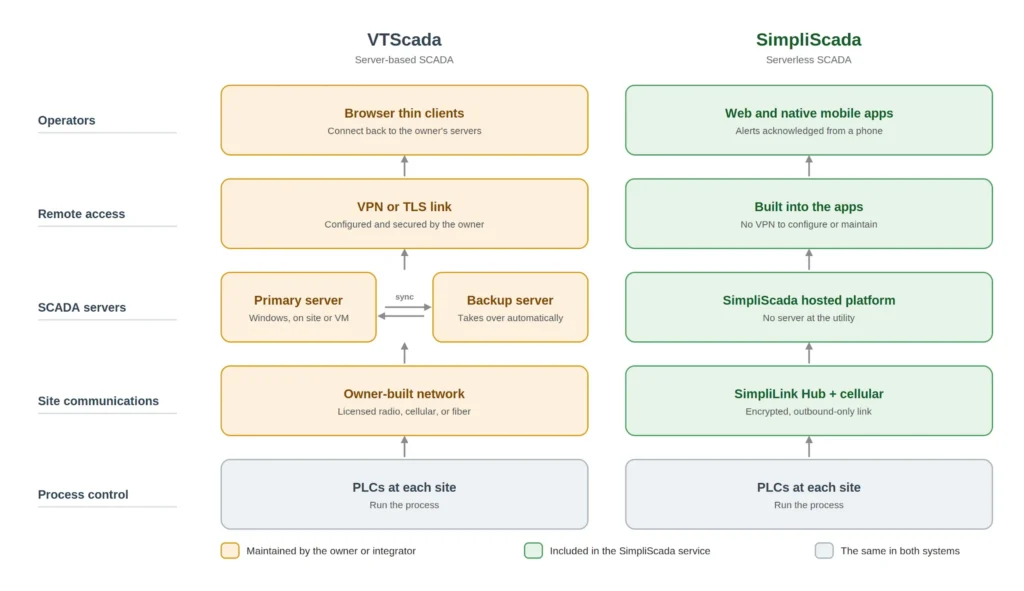
VTScada: servers you own and engineer. Windows servers poll every PLC and RTU over radio, cellular, or fiber that the utility builds and maintains. Operators work through browser-based thin clients connected to those servers. VTScada’s redundancy is a real strength: backup servers stay in sync and take over automatically if the primary fails. The trade-off is that the utility or its integrator buys, patches, backs up, and replaces every server.
SimpliScada: no server on your side. A SimpliLink Hub reads the PLC at each site and opens an encrypted, outbound-only cellular connection to SimpliScada’s hosted platform. Operators use web and mobile apps, and the PLC still runs the process.
What is serverless SCADA? Serverless SCADA is a SCADA system in which the utility runs no servers of its own. Field devices connect directly to a hosted platform that handles data storage, HMIs, alarms, and upgrades, and operators work entirely through web and mobile apps.
The bottom line
VTScada gives you redundancy you engineer and own. SimpliScada takes the server off your plate, and in both systems the PLC keeps control of the process.
See what changes when SCADA runs without a server.
What Is Each System Like to Use Every Day?
Both platforms give operators screens, history, reports, and alarms. VTScada offers deep configuration for a trained developer. SimpliScada is built so the operators and integrators using it every day can make changes themselves.
Building and Changing Screens
VTScada screens are built in Idea Studio, a drag-and-drop editor with a library of more than 4,500 symbols, plus an optional scripting language for advanced behavior. Editing requires VTScada’s Development license, so changes usually go through whoever holds it, often the integrator.
SimpliScada screens and dashboards are built with a drag-and-drop builder that needs no code. An operator can add a tank level or rearrange a dashboard without opening a ticket.
Looking Back at the Data
VTScada includes its Historical Data Viewer in every application. Operators can click a widget to plot its history, save groups of pens, and export the data.
In SimpliScada, operators choose the points they want and a time period, and the trend is ready.
Compliance Reports
VTScada includes a reports page with pre-defined water and wastewater reports, Excel templates, scheduling, and email delivery. For state-specific compliance forms, Trihedral references third-party reporting packages.
SimpliScada’s report builder includes automated regulatory reporting for readings like turbidity, residual, and flow, so monthly reports are ready without manual data pulls.
Getting an Alarm at Night
VTScada’s Alarm Notification add-on calls, texts, or emails the on-call list, and operators acknowledge by phone or reply. The owner supplies the delivery path: a voice modem, SIP phone system, or Twilio account for calls, an SMS service for texts, and an email server.
SimpliScada sends voice call, text, email, and push alerts directly, and operators acknowledge from their phones. There’s no voice modem, phone system, or outside notification service to set up.
The takeaway
VTScada rewards a skilled developer with fine control over every screen and report. SimpliScada puts those changes in the hands of the people running the system.
See what’s included with SimpliScada.
How Do SimpliScada and VTScada Handle Outages and Growth?
Uptime and scale are where VTScada’s long history shows most. SimpliScada takes a different approach: instead of adding more servers, it keeps control at the site and removes the utility’s server from the picture.
VTScada: Redundancy Built Into the Servers
VTScada’s failover is one of its strongest features, and it’s a big reason large utilities choose it.
- Two or three servers stay synchronized, and a backup takes over automatically if the primary fails
- History, alarms, and configuration carry over during a failover, so operators keep working
- Servers can sit at separate locations, which protects against a site-wide outage
- Trihedral has tested VTScada to 2.5 million tags, well beyond what most water systems need
Each redundant server is another machine the utility or its integrator buys, licenses, patches, and eventually replaces.
SimpliScada: Control Stays at the Site
With SimpliScada, the process never depends on a remote server staying online. If a site loses its cellular connection:
- The PLC keeps running the process on its own
- Remote visibility pauses until the connection returns
- The SimpliLink Hub reconnects automatically, with no one sent to the site
- The hub’s built-in power backup covers brief power interruptions
Each SimpliLink Hub+ supports up to 900 PLCs and 15,000 tags, and systems grow by adding hubs at new sites.
Where this matters: Sites with no usable cellular coverage are a real limit for SimpliScada. SimpliScada says so itself, and a local server can still make sense there.
For everywhere else, see how SimpliScada handles a lost connection.
Who Handles Security in Each System?
Security in SCADA depends on two things: how well the software is built, and how well the system around it is run. VTScada has strong credentials on the first. SimpliScada’s design shrinks the second.
VTScada: Certified Software, Owner-Run Defenses
Trihedral’s software development process is certified to IEC 62443-4-1 Maturity Level 3 by exida, upgraded in 2024. Trihedral also publishes a Security Guidelines Manual and builds user accounts and permissions into the software. For utilities whose procurement or insurance reviews ask for third-party certification, that’s a real advantage.
The deployment around the software is the owner’s job, including:
- Patching and hardening the Windows servers
- Designing firewalls and separating the control network from the business network
- Installing and renewing the TLS certificates for thin clients
- Setting up and securing remote access through a VPN or TLS
SimpliScada: Fewer Systems Left to Defend
SimpliScada’s approach is to reduce what a utility has to protect in the first place. The SimpliLink Hub encrypts data at the site and only connects outward over cellular. That means:
- No inbound ports to open at the plant
- No VPN to configure or keep current
- No PLC or radio network exposed for remote access
- No utility-owned SCADA server to patch
Platform security updates are handled by SimpliScada, so a small utility without a dedicated IT person isn’t responsible for keeping up with them.
Questions to Ask Any SCADA Vendor
-
Who patches the servers, and how quickly after a vulnerability is announced?
-
Which ports are open to the internet, and where?
-
How do operators reach the system from outside the plant?
-
What do the vendor's security certifications cover: the software, the development process, or the hosted service?
Can SimpliScada Work Alongside an Existing VTScada System?
Most utilities running VTScada aren’t looking to rip out a working system. SimpliScada connects to the PLCs already in the field, so it can be added one site at a time instead of all at once.
Common ways utilities and integrators approach it:
-
Start with the hard-to-reach sites.
Remote lift stations, wells, and tanks that were never worth building radio out to can be brought online with a SimpliLink Hub and its cellular link. -
Pilot one site first.
Put a single site on SimpliScada, let operators use it for a few weeks, and compare the experience before deciding anything bigger. -
Move in phases.
Shift sites over as servers come due for replacement or licenses come up for renewal, instead of funding one large migration.
The right plan depends on how each site’s PLCs and communications are set up today, especially where VTScada already polls the same PLC. That’s worth walking through with your integrator before the first hub goes in.
For integrators: If you support VTScada customers today, request a demo unit for your team and test SimpliScada against a PLC on your bench.
Frequently Asked Questions
What is the difference between SimpliScada and VTScada?
VTScada is Windows-based SCADA software that runs on servers the utility or its integrator owns and maintains, with built-in multi-server redundancy. SimpliScada is serverless SCADA. A SimpliLink Hub at each site connects existing PLCs over cellular to a hosted platform, and operators work through web and mobile apps, with no server at the utility.
Does SimpliScada work with the PLCs we already have?
Yes. SimpliScada works with Allen-Bradley, Siemens, ABB, and most other PLCs, over protocols including DNP3, Modbus, EtherNet/IP, OPC UA, and MQTT. A SimpliLink Hub installs at each site and reads the existing PLC, so the control logic and field equipment already in place stay where they are.
Do we need a server or VPN to run SimpliScada?
No. SimpliScada runs on a hosted platform, so the utility keeps no SCADA server, database, or VPN of its own. Each SimpliLink Hub encrypts data at the site and only connects outward over cellular, and operators sign in through web and mobile apps.
What happens if a SimpliScada site loses its cellular connection?
The PLC keeps running the process on its own, because control logic stays at the site. Remote visibility pauses until the connection returns, and the SimpliLink Hub reconnects automatically without anyone visiting the site.
How do SimpliScada alarms reach operators?
SimpliScada sends real-time voice call, text, email, and push alerts straight to the on-call operator, who can acknowledge them from a phone. Delivery is part of the service, so there’s no voice modem, phone system, SMS account, or email server for the utility to set up.
Can SimpliScada automate compliance reports?
Yes. SimpliScada’s report builder includes automated regulatory reporting for readings such as turbidity, residual, and flow. Operators set reports up with drag-and-drop tools and schedule them, without writing code or pulling data into spreadsheets by hand.
Can SimpliScada run alongside our current VTScada system?
Yes, SimpliScada can be added one site at a time. Many utilities start with remote sites that were never worth building radio out to, or pilot a single site before deciding on more. If VTScada already polls a PLC, plan that site’s setup with your integrator first.
How does SimpliScada's free trial compare with VTScada's?
SimpliScada’s 90-day free trial includes a working HMI, with SimpliScada engineers configuring your first 10 tags. VTScada offers a 90-day trial key for evaluation that isn’t licensed for production, plus VTScadaLIGHT, a free version for systems up to 50 I/O without alarm notification. Start your 90-day free trial.
Can systems integrators deploy SimpliScada?
Yes. Integrators deploy SimpliScada through its Automation Partner Program. They connect customer PLCs to SimpliLink Hubs, then build HMIs, reports, and alerts without designing or maintaining a server, so projects spend less time on infrastructure. Learn about the Automation Partner Program.
Related reading
- How Much Does a SCADA System Cost?
- Modern SCADA Without a Server
- SCADA for Small Water Systems
- Serverless SCADA FAQs for Water and Wastewater
- SimpliScada vs. Ignition
About this comparison: VTScada information comes from Trihedral’s product pages, help documentation, datasheets, and published security announcements, reviewed November 3, 2026. SimpliScada information comes from SimpliScada. Both products change over time, so check with each vendor for current details. VTScada, VTScadaLIGHT, and Trihedral are registered trademarks of Trihedral Engineering Limited.